
How Does Agentic AI Work for Small Businesses? A Step-by-Step Guide
- theaiconsultantpro
- 12 minutes ago
- 5 min read

How Does Agentic AI Work for Small Businesses? A Step-by-Step Guide
Last updated: June 5, 2026
Agentic AI for a small business is basically a team of software “doers” that can plan work, take actions in your tools, and report back—without you babysitting every step.
Agentic AI uses AI agents to plan tasks, take actions in business tools, and confirm results with guardrails, so small teams can run routine workflows with less manual follow-up.
If you’re searching “agentic AI small business,” you’re probably trying to answer one question: can this actually help a lean team get more done without hiring three more people?
Here’s the thing… most small businesses aren’t trying to build robots. They’re trying to stop living inside inboxes, spreadsheets, and “quick questions” that somehow take all day.
If you want the done-for-you version (strategy + setup + guardrails), you can hire an AI consultant—then use this guide to sanity-check the approach.
What “agentic AI” actually means (in plain English)
Agentic AI is built around AI agents (software that can plan steps and take actions toward a goal). Think of agents as “staff members” that don’t need coffee breaks, but do need clear instructions and boundaries.
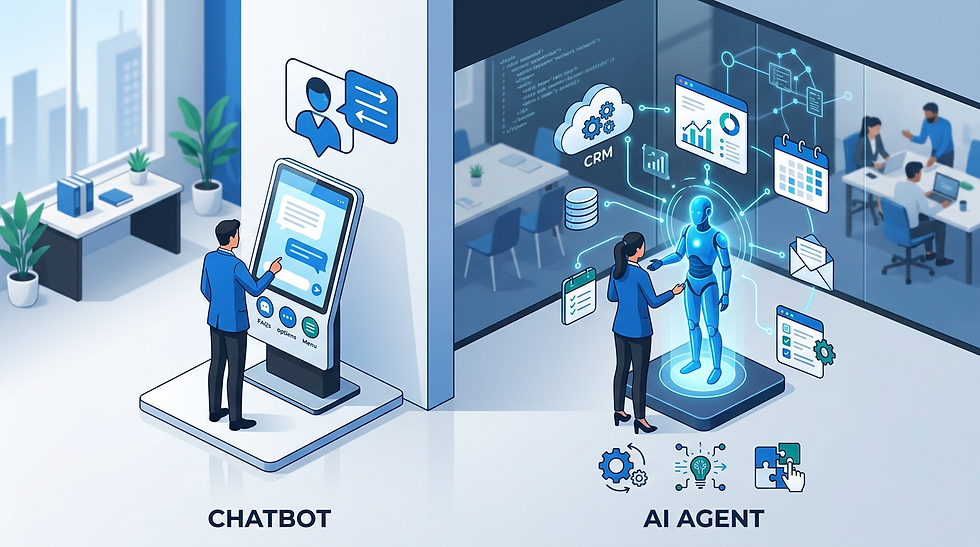
The big difference between a chatbot and an agent is simple: a chatbot answers, an agent does.
Example: instead of telling you what to write in a follow-up email, an agent can draft it, find the right customer record, send it for approval, and log it in your CRM.
How does agentic AI work for small businesses? The 7-step flow
Let’s break it down. Most agentic workflows follow the same loop: understand the goal → plan the steps → take actions → verify → report.
Step 1) Define the goal and the finish line
Start with one sentence your agent can’t misread. “Handle new leads” is vague. “When a new web form arrives, qualify it, create a CRM record, and book a call if it matches criteria” is usable.
Ask yourself: if a new hire joined tomorrow, could they tell what “done” looks like without guessing? If not, your agent will guess too. And agents are optimistic guessers.
Step 2) Choose the “brain” model (Claude, Gemini, ChatGPT, Copilot)
Your agent needs a large language model (LLM). That “brain” is where it reasons, writes, and decides what to do next.
Claude: strongest for business writing, contract review, research synthesis, and customer emails when you need steady reasoning.
Gemini: great when your workflow lives in Google Workspace and when you need multimodal help (docs, images, PDFs).
ChatGPT: solid alternative for brainstorming, custom GPT setups, and plugin-style workflows.
Copilot: best fit when the work is inside Microsoft 365 (Excel, Outlook, Teams) and you want lighter automation around that stack.
Light joke break: picking an LLM without thinking about your tools is like hiring a CFO and then refusing to use accounting software. Bold strategy.
Step 3) Connect your tools (email, calendar, CRM, accounting, helpdesk)
Agents don’t magically “know” your business. They need access—usually through APIs or automation platforms—to read data and take actions.
Common small-business connections: Gmail/Outlook, Google Calendar, HubSpot, Stripe, QuickBooks, Shopify, Zendesk, and your website forms.
Want a concrete example of how this looks end-to-end? See our guide on AI workflow automation for small businesses.
Step 4) Give the agent instructions (prompts) and constraints (policies)
This is where most “agentic AI” projects win or lose.
Good instructions include: tone, decision rules, what to do when uncertain, and what absolutely requires human approval.
Thought question: if your agent made one mistake in public, what would be the most expensive mistake it could make? Start your guardrails there.
Step 5) Let it plan, then execute actions (with approvals where needed)
Agentic workflows usually run in a loop:
Plan: decide the steps needed.
Act: call tools (send email, create task, update record).
Check: confirm the outcome and handle errors.
This is why agentic AI feels different. It’s not just “smart text.” It’s smart text with hands.
Step 6) Verify results and log what happened (so you can trust it)
A small business doesn’t need “perfect.” It needs predictable.
So build verification into the workflow: did the calendar event get created, did the CRM update succeed, did the customer get the right email template, did the invoice total match the order total?
This is also where good logging matters. If you can’t audit it, you can’t scale it.
Step 7) Improve the workflow weekly (tiny tweaks, big compounding gains)
Agents get better when you treat them like process improvements, not magic.
Thought question: which workflow would you be embarrassed to admit is still manual in 2026? That’s often your best first automation target.
3 real-world stats (so you know this isn’t just hype)
Where agentic AI pays off fastest (small business examples)
Lead handling: qualify → route → schedule → log notes.
Customer support: summarize ticket → propose response → update status → follow up.
Back office: invoice checks, collections nudges, vendor quote comparisons.
If sales is your pressure point, our article on building an AI sales pipeline shows how agents fit into lead capture, follow-ups, and scheduling.
Common mistakes (and how to avoid an agent that causes “extra work”)
No “human-in-the-loop” points: start with approvals for anything customer-facing or financial.
Messy data: if your CRM is a “maybe database,” your agent will faithfully automate the chaos.
Over-automating too early: pick one workflow, then expand.
If you’re still deciding whether you need help, this breakdown of what does an AI consultant do will help you spot where outside support saves time.
FAQ
Is agentic AI safe for a small business?
It can be, if you use permissions, approvals, and logging. Start with read-only access, then add actions where mistakes are low-cost. Treat anything involving money, customer messages, or data exports as approval-required until proven stable.
What’s the simplest agentic AI workflow to start with?
A good first win is lead follow-up: qualify the lead, draft a reply, propose times, and create a calendar hold. It’s repetitive, measurable, and the “oops” risk is low if you keep a human approval step at first.
Key Takeaways
Agentic AI means AI that can take actions, not just answer questions.
Start with one workflow, define “done,” then add guardrails.
Claude and Gemini are great default “brains,” depending on your tool stack.
Verification + logs are what make agents trustworthy for small teams.
Ready to turn this into an actual workflow?
If you want an agentic workflow mapped to your tools (and not a generic demo), book a quick call. We’ll identify one high-ROI workflow, define guardrails, and outline the build plan.


Comments